芯耀
芯耀
 与非AI
与非AI





 1435
1435
2026全国大学生嵌入式芯片与系统设计竞赛应用赛道报名正在火热进行中,其中瑞芯微&飞凌嵌入式赛题重磅选用基于旗舰芯片RK3588设计的ELF 2开发板以及ELF-RV1126B开发板、ELF-RK3506开发板作为参赛平台。
所有的选题都是采用开放和半开放的方式设定,核心宗旨绝非简单的技术验证,而是重点考察同学们对特定行业的洞察力与实际问题解决能力。我们鼓励参赛团队立足真实行业场景,深挖场景痛点,把所学的嵌入式专业知识转化为切实可行的解决方案,最终打磨出可落地、可现场演示的完整作品,真正实现从理论知识到工程实践的转化。
近期,AI圈现象级开源项目OpenClaw刷屏全网,凭借 “能动手执行” 的硬核能力,彻底打破传统AI“只说不做”的局限。基于RK3588设计的ELF 2开发板搭载6TOPS NPU,正是OpenClaw落地边缘智能的绝佳平台。
今天我们就带来实战教程:如何在ELF 2开发板上部署 OpenClaw,为你的竞赛项目解锁AI自动执行新能力,助力创意快速落地!
1.1.网络配置
需要确保开发板具备联网能力。此处开发板通过以太网卡接入网络(亦可使用无线通信模块)执行ping www.elfboard.com -c 5命令后,成功收到回包且无丢包,表明网络连接正常。
elf@elf2-desktop:~$ sudo nmcli con mod 'Wired connection 1' ipv4.method manual ipv4.addresses 172.20.8.7/24 ipv4.gateway 172.20.8.254 ipv4.dns 8.8.8.8 connection.autoconnect yes
[sudo] password for elf:
elf@elf2-desktop:~$ sudo nmcli con up 'Wired connection 1'
Connection successfully activated (D-Bus active path: /org/freedesktop/NetworkManager/ActiveConnection/3)
elf@elf2-desktop:~$ ping www.elfboard.com -c 5
PING www.elfboard.com (211.149.236.219) 56(84) bytes of data.
64 bytes from 211.149.236.219 (211.149.236.219): icmp_seq=1 ttl=54 time=36.2 ms
64 bytes from 211.149.236.219 (211.149.236.219): icmp_seq=2 ttl=54 time=36.9 ms
64 bytes from 211.149.236.219 (211.149.236.219): icmp_seq=3 ttl=54 time=35.1 ms
64 bytes from 211.149.236.219: icmp_seq=4 ttl=54 time=43.5 ms
64 bytes from 211.149.236.219: icmp_seq=5 ttl=54 time=35.3 ms
--- www.elfboard.com ping statistics ---
5 packets transmitted, 5 received, 0% packet loss, time 14515ms
rtt min/avg/max/mdev = 35.054/37.380/43.513/3.136 ms
1.2.OpenClaw安装及配置
OpenClaw官方提供了一种安装脚本的方式来安装OpenClaw,会自动升级Node.js等配置。
elf@elf2-desktop:~$ curl -fsSL https://openclaw.ai/install.sh | bash
  🦞 OpenClaw Installer
  I'm not magic—I'm just extremely persistent with retries and coping strategies.
✓ Detected: linux
Install plan
OS: linux
Install method: npm
Requested version: latest
[1/3] Preparing environment
· Node.js not found, installing it now
· Installing Node.js via NodeSource
· Installing Linux build tools (make/g++/cmake/python3)
✓ Build tools installed
✓ Node.js v22 installed
· Active Node.js: v22.22.1 (/usr/bin/node)
· Active npm: 10.9.4 (/usr/bin/npm)
[2/3] Installing OpenClaw
✓ Git already installed
· Configuring npm for user-local installs
✓ npm configured for user installs
· Installing OpenClaw v2026.3.13
✓ OpenClaw npm package installed
✓ OpenClaw installed
[3/3] Finalizing setup
! PATH missing npm global bin dir: /home/elf/.npm-global/bin
  This can make openclaw show as "command not found" in new terminals.
  Fix (zsh: ~/.zshrc, bash: ~/.bashrc):
    export PATH="/home/elf/.npm-global/bin:$PATH"
🦞 OpenClaw installed successfully (OpenClaw 2026.3.13 (61d171a))!
The lobster has landed. Your terminal will never be the same.
· Starting setup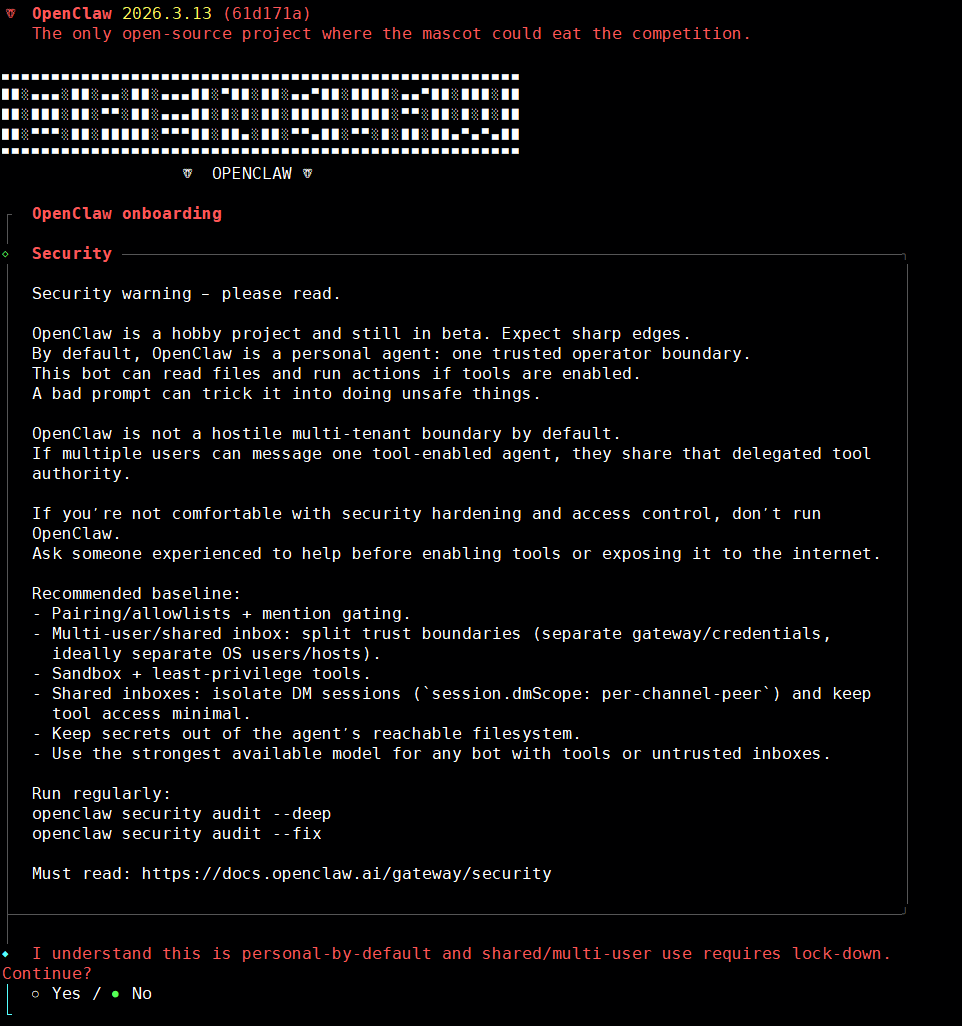
◆  I understand this is personal-by-default and shared/multi-user use requires lock-down. Continue?
│  ● Yes / ○ No
└
快速开始,选择QuickStart
◆  Onboarding mode
│  ● QuickStart (Configure details later via openclaw configure.)
│  ○ Manual
└
模型配置,先跳过后续再配置
◆  Model/auth provider
......
│  ● Skip for now
└
模型供应商选择所有供应商
◆  Filter models by provider
│  ● All providers
.....
└
默认模型,默认保持不动,后续再配置
◆  Default model
│  ● Keep current (default: anthropic/claude-opus-4-6)
......
└
连接频道设置,先跳过,后续再单独配置
◆  Select channel (QuickStart)
......
│  ● Skip for now (You can add channels later via `openclaw channels add`)
└
联网搜索提供商设置,先跳过
Search provider
│  ○
Brave Search
│  ○
Gemini (Google Search)
│  ○
Grok (xAI)
│  ○
Kimi (Moonshot)
│  ○
Perplexity Search
│  ●
Skip for now (Configure later with openclaw configure --section web)
当前不配置Skills,后续可以让openclaw自己配置
◆  Configure skills now? (recommended)
│  ○ Yes / ● No
└
使能hooks,将所有的配置全部使用空格选中,然后回车确认
◆  Enable hooks?
│  ◻ Skip for now
│  ◼ 🚀 boot-md (Run BOOT.md on gateway startup)
│  ◼ 📎 bootstrap-extra-files (Inject additional workspace bootstrap files via glob/path patterns)
│  ◼ 📝 command-logger (Log all command events to a centralized audit file)
│  ◼ 💾 session-memory (Save session context to memory when /new or /reset command is issued)
完成安装
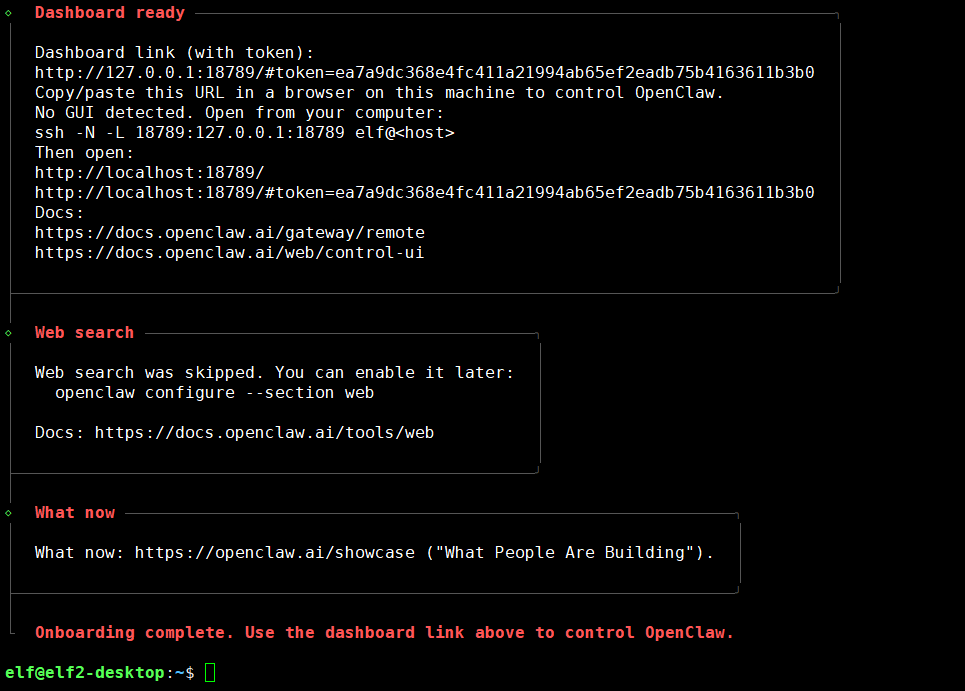
1.3.模型配置
1.3.1.获取模型的APIKEY
APIKEY可以理解为是身份证,配置OpenClaw时会绑定API Key,每次调用api运行模型时都会从该API Key的账户中扣钱。
MiniMax网站:https://platform.minimaxi.com/
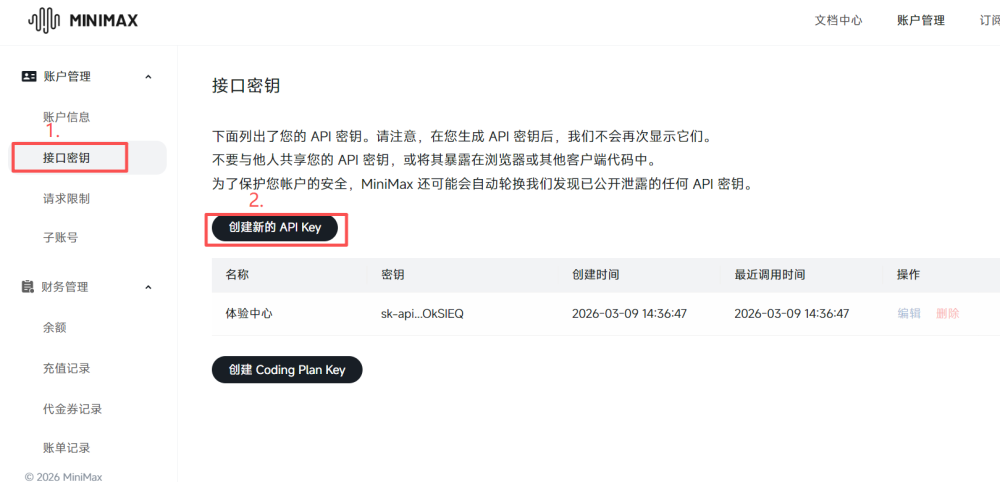
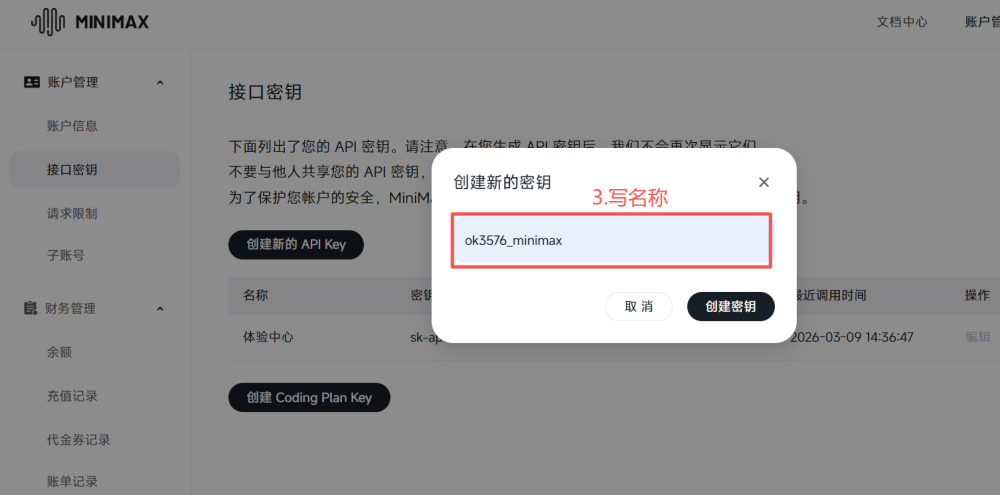
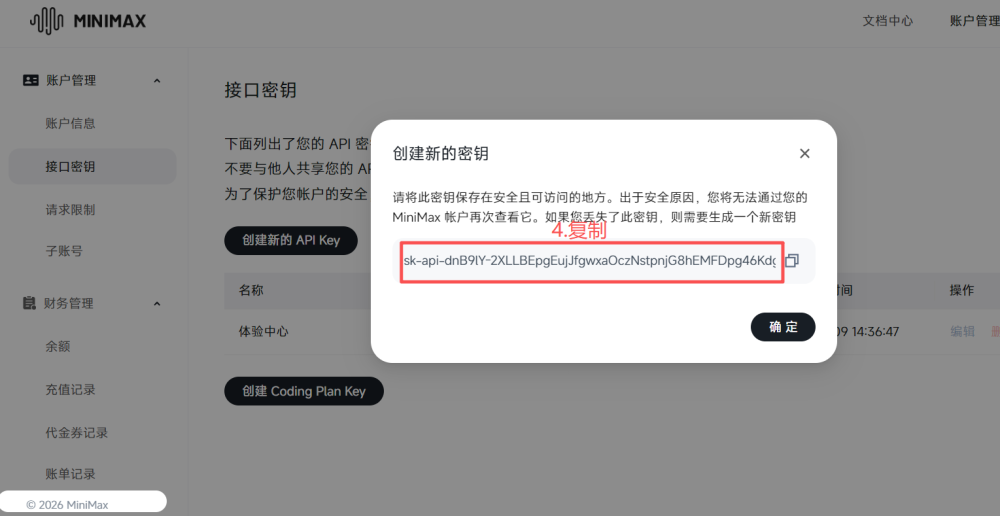
1.3.2.配置模型API Key
打开界面配置
elf@elf2-desktop:~$ source ~/.bashrc
elf@elf2-desktop:~$ openclaw config
选择Local
◆  Where will the Gateway run?
│  ● Local (this machine) (No gateway detected (ws://127.0.0.1:18789))
│  ○ Remote (info-only)
└
选择模型
◆  Select sections to configure
│  ○ Workspace
│  ● Model (Pick provider + credentials)
│  ○ Web tools
│  ○ Gateway
│  ○ Daemon
│  ○ Channels
│  ○ Skills
│  ○ Health check
│  ○ Continue
└
这里以选择MinMax为例进行操作,这是个国内的模型,并且注册新用户会有15元的额度。
◆  Model/auth provider
│  ○ OpenAI
│  ○ Anthropic
│  ○ Chutes
│  ● MiniMax (M2.5 (recommended))
│  ○ Moonshot AI (Kimi K2.5)
│  ○ Google
│  ○ xAI (Grok)
│  ○ Mistral AI
│  ○ Volcano Engine
│  ...
└
选择MiniMax CN — API Key
◆  MiniMax auth method
│  ○ MiniMax Global — OAuth (minimax.io)
│  ○ MiniMax Global — API Key (minimax.io)
│  ○ MiniMax CN — OAuth (minimaxi.com)
│  ● MiniMax CN — API Key (minimaxi.com) (sk-api- or sk-cp- keys supported)
│  ○ Back
└
选择Paste API key now
◆  How do you want to provide this API key?
│  ● Paste API key now (Stores the key directly in OpenClaw config)
│  ○ Use external secret provider
└
粘贴API Key
◆  Enter MiniMax CN API key (sk-api- or sk-cp-)
https://platform.minimaxi.com/user-center/basic-information/interface-key
│
└
接下来选择模型,已选择MiniMax-M2.5为例
◆  Models in /model picker (multi-select)
│
│  Search: _
│  ...
│  ◻ huggingface/zai-org/GLM-4.7-Flash
│  ◻ huggingface/zai-org/GLM-5
│  ◻ huggingface/moonshotai/Kimi-K2-Instruct
│  ◻ huggingface/moonshotai/Kimi-K2-Instruct-0905
│  ◻ huggingface/moonshotai/Kimi-K2-Thinking
│  ◻ huggingface/moonshotai/Kimi-K2.5
│  ◻ huggingface/XiaomiMiMo/MiMo-V2-Flash
│  ◻ huggingface/MiniMaxAI/MiniMax-M2.1
│  ◻ huggingface/MiniMaxAI/MiniMax-M2.5
│  ◻ huggingface/Qwen/Qwen3-235B-A22B-Thinking-2507
│  ◻ huggingface/Qwen/Qwen3-Coder-480B-A35B-Instruct
│  ◻ huggingface/Qwen/Qwen3-Coder-Next
│  ◻ huggingface/Qwen/Qwen3-Next-80B-A3B-Instruct
│  ◻ huggingface/Qwen/Qwen3-Next-80B-A3B-Thinking
│  ◻ huggingface/Qwen/Qwen3.5-397B-A17B
│  ◻ kimi-coding/kimi-k2-thinking
│  ◻ kimi-coding/k2p5
│  ◼ minimax/MiniMax-M2.5 (MiniMax M2.5 · ctx 195k · reasoning · alias: Minimax)
│  ◻ minimax/MiniMax-M2.5-highspeed
│  ...
│  ↑/↓ to navigate • Tab: select • Enter: confirm • Type: to search
└
1.3.3.测试
开发板端启用网关
elf@elf2-desktop:~$ openclaw gateway
🦞 OpenClaw 2026.3.13 (61d171a)
   If it works, it's automation; if it breaks, it's a "learning opportunity."
13:01:05 [canvas] host mounted at http://0.0.0.0:18789/__openclaw__/canvas/ (root /home/elf/.openclaw/canvas)
13:01:05 [gateway] ⚠️  Gateway is binding to a non-loopback address. Ensure authentication is configured before exposing to public networks.
13:01:05 [gateway] ⚠️  gateway.controlUi.dangerouslyAllowHostHeaderOriginFallback=true is enabled. Host-header origin fallback weakens origin checks and should only be used as break-glass.
13:01:05 [heartbeat] started
13:01:05 [health-monitor] started (interval: 300s, startup-grace: 60s, channel-connect-grace: 120s)
13:01:05 [gateway] agent model: minimax/MiniMax-M2.5
13:01:05 [gateway] listening on ws://0.0.0.0:18789 (PID 6807)
13:01:05 [gateway] log file: /tmp/openclaw/openclaw-2026-03-20.log
13:01:05 [gateway] security warning: dangerous config flags enabled: gateway.controlUi.allowInsecureAuth=true, gateway.controlUi.dangerouslyAllowHostHeaderOriginFallback=true, gateway.controlUi.dangerouslyDisableDeviceAuth=true. Run `openclaw security audit`.
13:01:05 [browser/server] Browser control listening on http://127.0.0.1:18791/ (auth=token)
13:01:06 [hooks:loader] Registered hook: boot-md -> gateway:startup
13:01:06 [hooks:loader] Registered hook: bootstrap-extra-files -> agent:bootstrap
13:01:06 [hooks:loader] Registered hook: command-logger -> command
13:01:06 [hooks:loader] Registered hook: session-memory -> command:new, command:reset
13:01:06 [hooks] loaded 4 internal hook handlers
13:01:08 [ws] security warning: websocket origin accepted via Host-header fallback conn=2d7442a3-61c7-4165-9b3f-b373559d5061 count=1 host=localhost:18789 origin=http://localhost:18789
13:01:08 [gateway] security metric: gateway.controlUi.dangerouslyAllowHostHeaderOriginFallback accepted a websocket connect request
13:01:08 [ws] webchat connected conn=2d7442a3-61c7-4165-9b3f-b373559d5061 remote=127.0.0.1 client=openclaw-control-ui webchat v2026.3.13
13:01:14 [ws] webchat disconnected code=1006 reason=n/a conn=2d7442a3-61c7-4165-9b3f-b373559d5061#ssh
-N -L 18789:127.0.0.1:18789 <用户名>@<服务器公网IP>
PS C:\Users\Administrator> ssh -N -L 18789:127.0.0.1:18789 elf@172.20.8.7
elf@172.20.8.7's password:在本地浏览器访问:
http://localhost:18789
http://localhost:18789/#token=<你的Token>
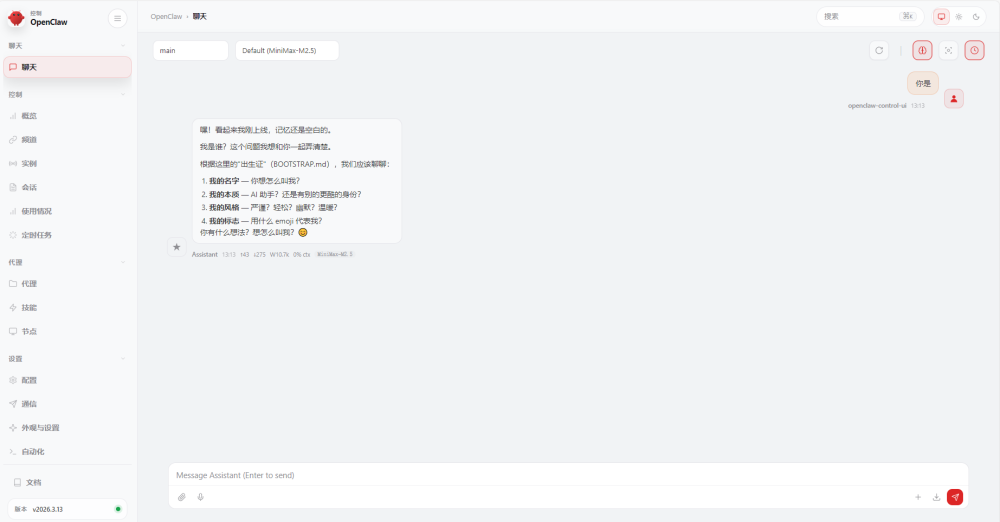
1.4.接入飞书
打开飞书的开发者后台,并注册账号,
网址:https://open.feishu.cn/
1.4.1.创建企业自建应用
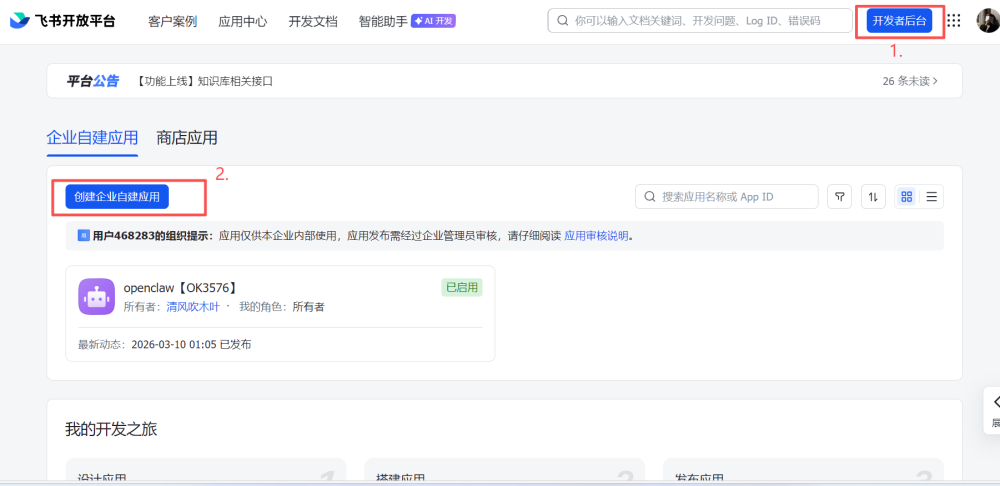
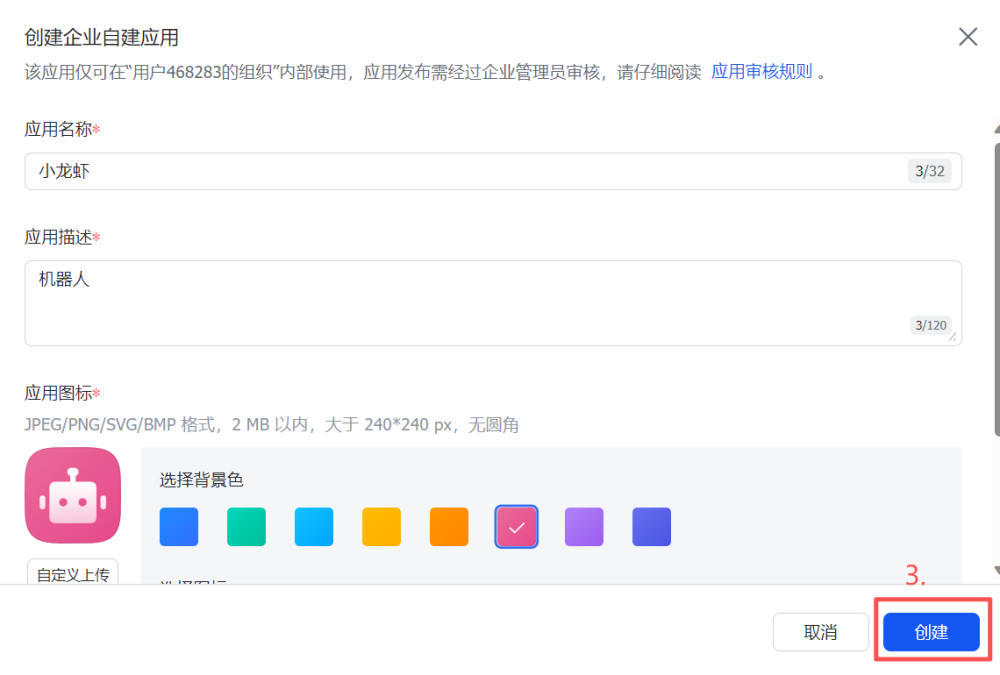
1.4.2.添加机器人
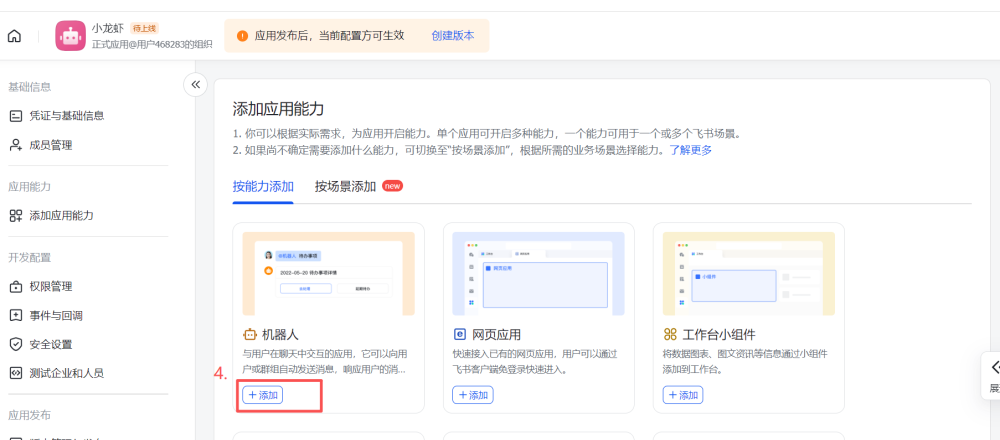
1.4.3.开通权限
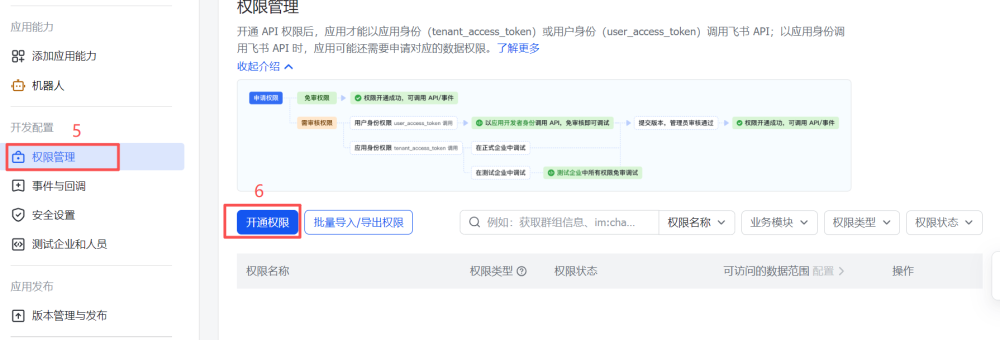
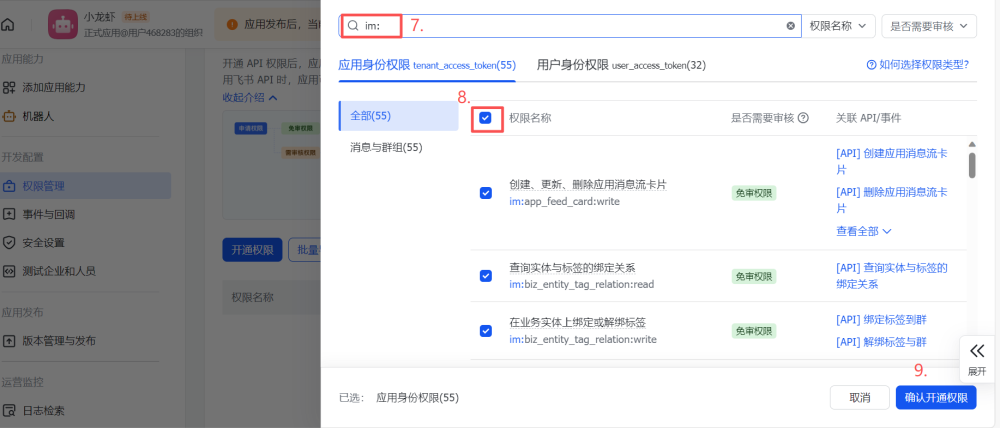
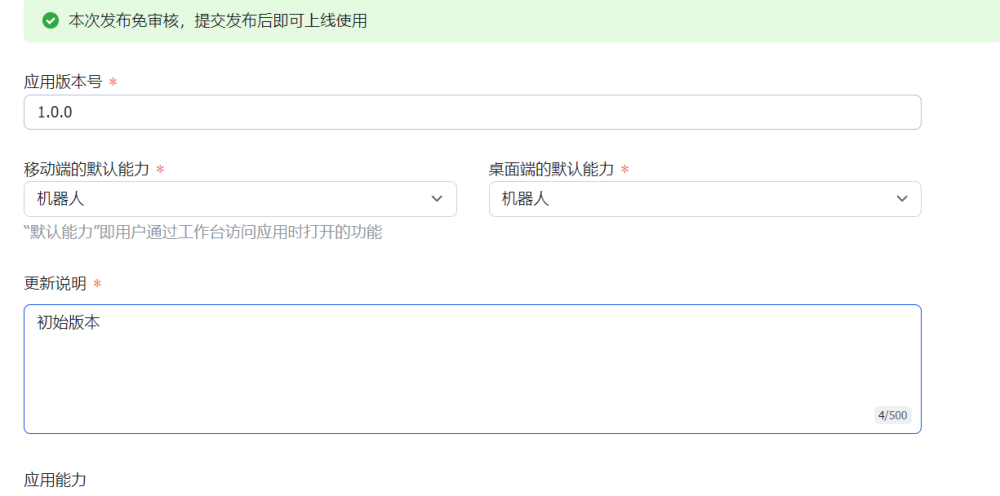
1.4.4.创建版本
打开OpenClaw的配置界面,选择Channels
◆  Select sections to configure
│  ○ Workspace
│  ○ Model
│  ○ Web tools
│  ○ Gateway
│  ○ Daemon
│  ● Channels (Link WhatsApp/Telegram/etc and defaults)
│  ○ Skills
│  ○ Health check
│  ○ Continue
└◆ Channels
│ ● Configure/link (Add/update channels; disable unselected accounts)
│ ○ Remove channel config
└◆ Select a channel
│ ○ Telegram (Bot API)
│ ○ WhatsApp (QR link)
│ ○ Discord (Bot API)
│ ○ IRC (Server + Nick)
│ ○ Google Chat (Chat API)
│ ○ Slack (Socket Mode)
│ ○ Signal (signal-cli)
│ ○ iMessage (imsg)
│ ○ LINE (Messaging API)
│ ● Feishu/Lark (飞书) (plugin · install)
│ ○ Nostr (NIP-04 DMs)
│ ○ Microsoft Teams (Bot Framework)
│ ○ Mattermost (plugin)
│ ○ Nextcloud Talk (self-hosted)
│ ○ Matrix (plugin)
│ ○ BlueBubbles (macOS app)
│ ○ Zalo (Bot API)
│ ○ Zalo (Personal Account)
│ ○ Synology Chat (Webhook)
│ ○ Tlon (Urbit)
│ ○ Finished
└◆ Install Feishu plugin?
│ ● Download from npm (@openclaw/feishu)
│ ○ Use local plugin path
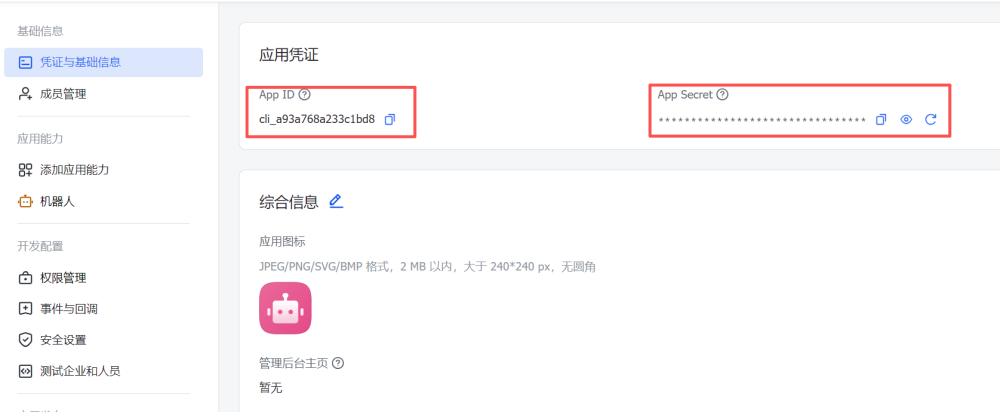
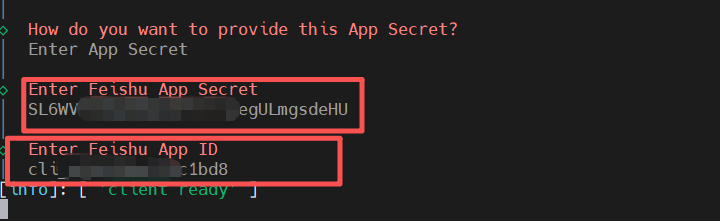
│ ○ Skip for now配置APP secret和 APP ID,选择Enter App Secret
◆  How do you want to provide this App Secret?
│  ● Enter App Secret (Stores the credential directly in OpenClaw config)
│  ○ Use external secret provider
└
打开飞书的凭证与基础信息,依次粘贴到openclaw的配置中
选择实时通信
◆  Feishu connection mode
│  ● WebSocket (default)
│  ○ Webhook
└
选择国内飞书
◆  Which Feishu domain?
│  ● Feishu (feishu.cn) - China
│  ○ Lark (larksuite.com) - International
└
选择所有群聊都可以使用机器人
◆  Group chat policy
│  ○ Allowlist - only respond in specific groups
│  ● Open - respond in all groups (requires mention)
│  ○ Disabled - don't respond in groups
└
退出配置
◆  Select a channel
│  ○ Telegram (Bot API)
│  ○ WhatsApp (QR link)
│  ○ Discord (Bot API)
│  ○ IRC (Server + Nick)
│  ○ Google Chat (Chat API)
│  ○ Slack (Socket Mode)
│  ○ Signal (signal-cli)
│  ○ iMessage (imsg)
│  ○ LINE (Messaging API)
│  ○ Feishu/Lark (飞书)
│  ○ Nostr (NIP-04 DMs)
│  ○ Microsoft Teams (Bot Framework)
│  ○ Mattermost (plugin)
│  ○ Nextcloud Talk (self-hosted)
│  ○ Matrix (plugin)
│  ○ BlueBubbles (macOS app)
│  ○ Zalo (Bot API)
│  ○ Zalo (Personal Account)
│  ○ Synology Chat (Webhook)
│  ○ Tlon (Urbit)
│  ● Finished (Done)
└
同意私聊访问策略
◆  Configure DM access policies now? (default: pairing)
│  ● Yes / ○ No
└
便于测试,选择open不需要进行配对,正式使用选择Pairing
◆  Feishu DM policy
│  ○ Pairing (recommended)
│  ○ Allowlist (specific users only)
│  ● Open (public inbound DMs)
│  ○ Disabled (ignore DMs)
└
退出
◆  Select sections to configure
│  ○ Workspace
│  ○ Model
│  ○ Web tools
│  ○ Gateway
│  ○ Daemon
│  ○ Channels
│  ○ Skills
│  ○ Health check
│  ● Continue (Done)
└
启用网关
elf@elf2-desktop:~$ openclaw gateway
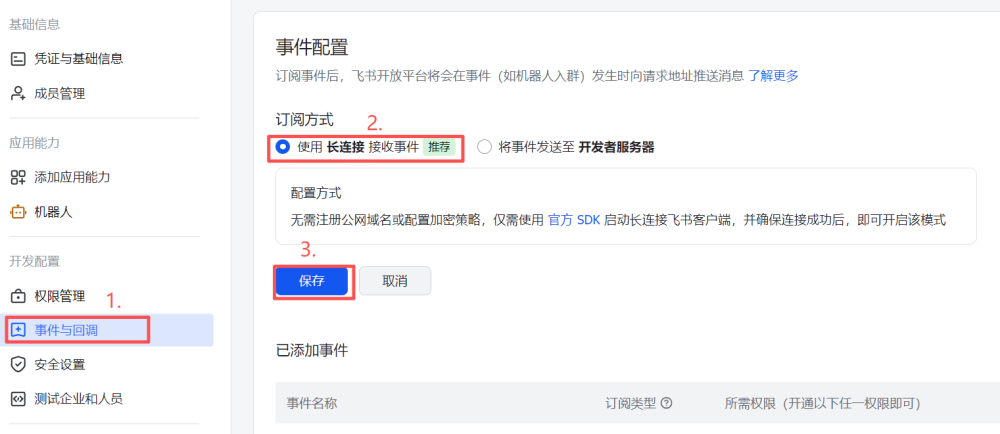
1.4.6. 事件配置
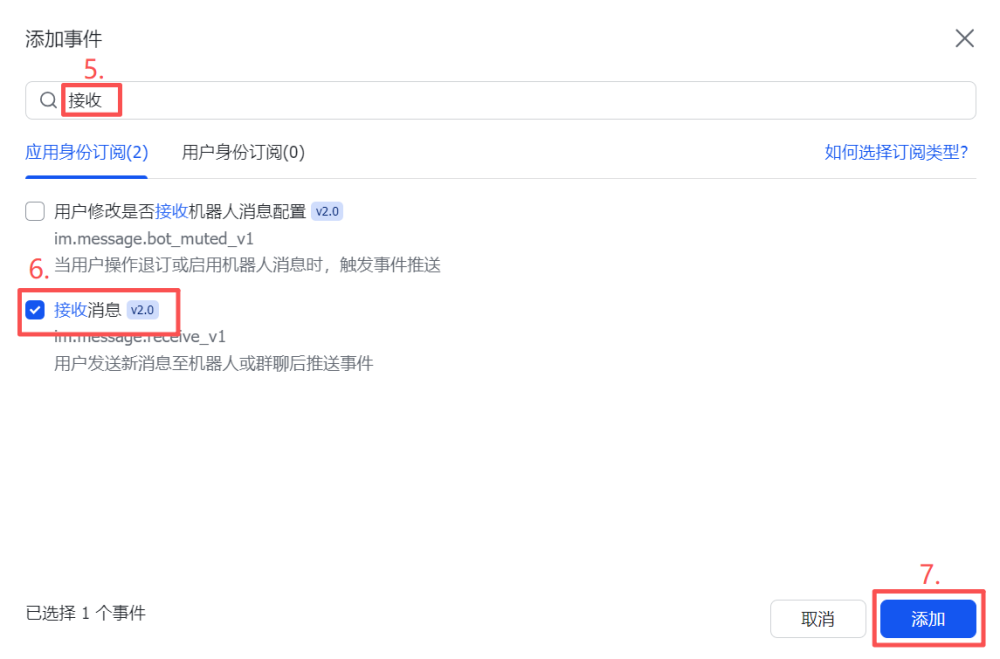
1.4.7. 添加事件
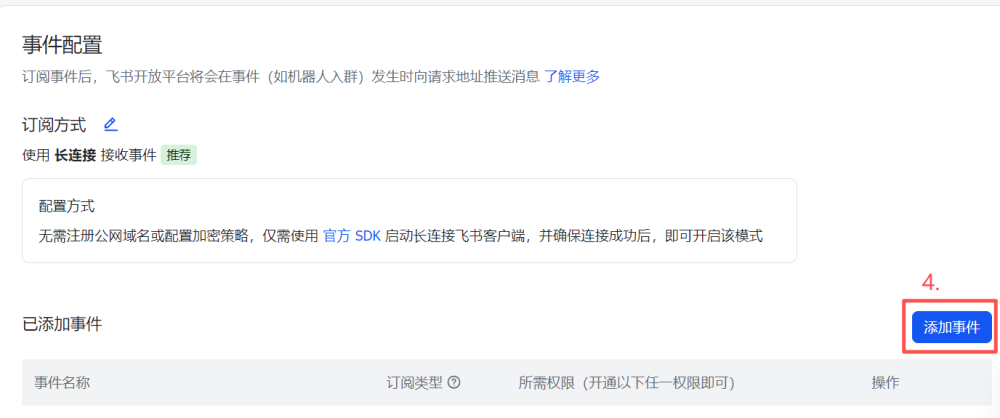
选择接收消息的订阅
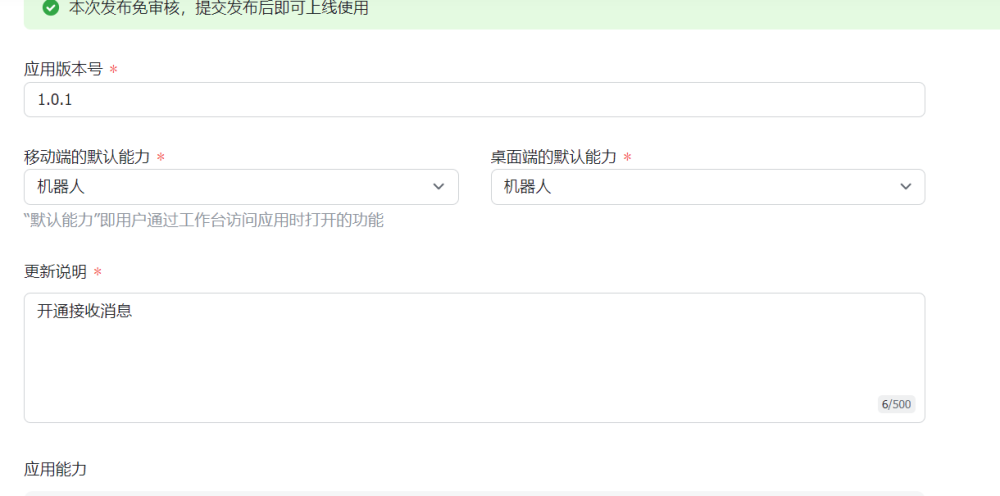
1.4.8. 更新版本
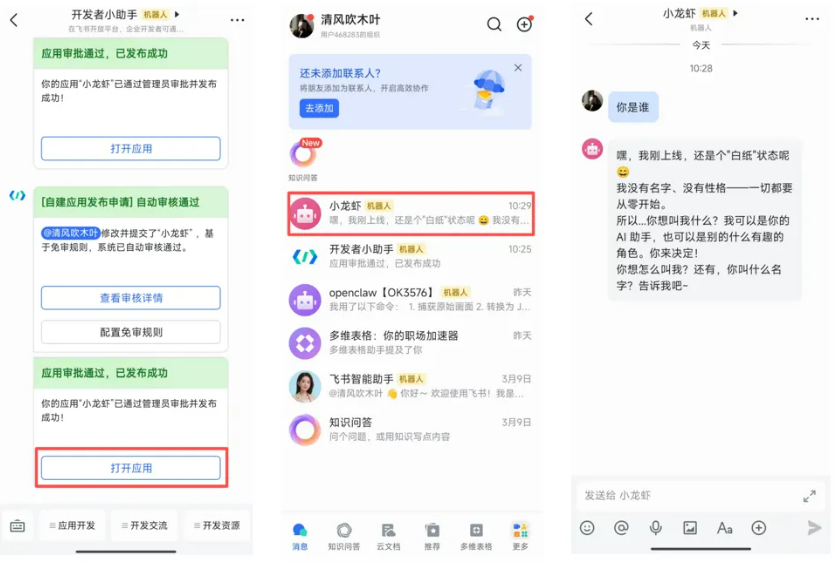
1.4.9. 测试
手机下载飞书app,打开应用进行对话测试